
8. Conditional Statements#
Michael Hrycek-Robinson and Saleh Rezaeiravesh,
saleh.rezaeiravesh@manchester.ac.uk
Department of Mechanical and Aerospace Engineering, The University of Manchester, Manchester, UK
A primary application of conditional statements is within if statements, which execute a specific block of code only if a given condition evaluates to True. In practice, we often use additional structures like else, elif, and nested if statements to handle more complex decision-making scenarios.
8.1. Intended Learning Outcomes#
After trying this notebook, you should be able to:
Use conditional statements and logic operators,
Develop
if,else, andelifstatements,Implement nested if statements.
8.2. Conditional Operators#
Conditional operators are comparisons made between two values, used to obtain a True or False value.
There are 6 main types of conditional operators in python:
Operator |
Name |
Description |
|---|---|---|
== |
Equality |
Checks if 2 values are identical |
!= |
Inequality |
Checks if 2 values aren’t identical |
> |
Greater than |
Checks if the first value is greater than the second |
>= |
Greater than or equal to |
Checks if the first value is greater than or equal to the second |
< |
Less than |
Checks if the first value is less than the second |
<= |
Less than or equal to |
Checks if the first value is less than or equal to the second |
Let’s look at a simple example. Assume, we have two variables a and b with assigned values and want to evaluate the outcome of different conditional operators.
a = 1
b = 2
As we see below, the outcomes of the conditional statements are Boolean.
print("a == b", a == b)  #Is a equal to b?
print("a != b", a != b)  #Is not a equal to b?
print("a > b", a > b)   #Is a greater than b?
print("a >= b", a >= b)  #Is a greater than or equal to b?
print("a < b", a < b)   #Is a less than b?
print("a <= b", a <= b)  #Is a less than or equal to b?
a == b False
a != b True
a > b False
a >= b False
a < b True
a <= b True
Not that the variables that are compared to each other, can be of different types.
a = 1
b = 'hello'

print(a == b)
False
Clearly in this example, an ineteger cannot be equal to a string. But, we can compare, for instance, two strings:
a = 'hello'
b = 'Hello'

print(a == b)
print(a > b)
print(a < b)
False
True
False
We can also compare the outcome of different operators applied to the variables. For instance, the lengths of the above two strings:
print(len(a) == len(b))
True
8.3. Logic Gates#
In many scenarios, we need to combine two or more conditional statements. To this end, logic gates can be used with the top three most commonly used ones listed below:
Logic Gate |
Description |
|---|---|
and |
Checks if all conditionals are True to return a value of True. |
or |
Checks if at least one of the conditions is True to return a value of True. |
not |
Checks if the opposite of the conditional is True. |
In the following example, we can compare different coinditional statements between three variables:
a = 1
b = 2
c = 3
When using and, both conditions should evaluate to True:
print(b > a and c > b)
print(a > b and c > b)
True
False
When using or, at least one of the conditions should be True:
print(b > a or  c > b)
print(a > b or  c > b)
print(a > b or  b > c)
True
True
False
The two conditionals below are the same:
print(not b > a)
print(b <= a)
False
False
8.4. If Statements#
Conditional operators are useful when implemented in if statements and while loops (See the notebook on Loops). If statements are constructs that execute specific blocks of code only when a given condition is met (i.e., when it evaluates to True).
The general structure of an if statement is shown below. Note that a colon (:) is required at the end of the condition, and the statements to be executed within the if block must be indented. Any commands outside the if block should return to the same indentation level as the start of the if statement.
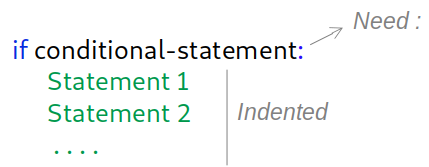
Let’s look at a simple example:
a=1
b=2

if a < b:
    print("a is smaller than b")

print("This line is outside of the if statement")  #is not part of the if-statement
a is smaller than b
This line is outside of the if statement
Example: Write a script that checks if a specific object exists in a given list. If not, the object must be added to the list.
myList = ['blue','red','bird',-4.6,5.8,0.25,0]  #given list
a = 'tree'   #input variable

if a not in myList:
   myList.append(a)
   print('input is added to the list.')
   print('updated list is:',myList)
input is added to the list.
updated list is: ['blue', 'red', 'bird', -4.6, 5.8, 0.25, 0, 'tree']
8.4.1. else & elif#
Along with the simple if statements, else and elif statements can also be used.
elsewill execute a set of commands if the condition in the associatediforelifstatement is notTrue.elif(short for else if) will run anotherifstatement (with its own conditional statement) when condition in the previousiforelifevaluates toFalse.
The example structures of the compound if statements are illustrated below.
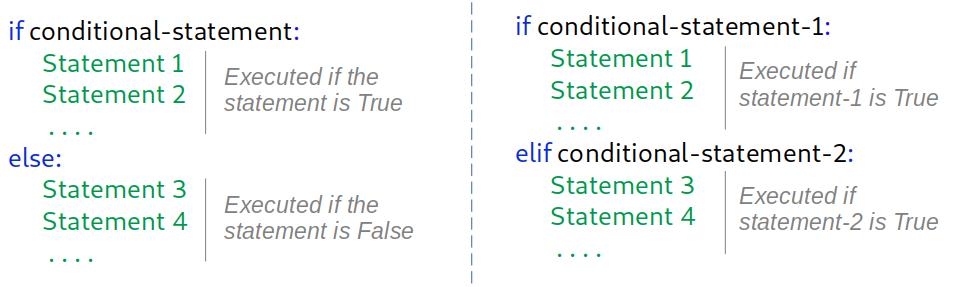
Example: Write a script that takes in a floating input and:
returns its sqaure if the input is positive,
returns its cube value if the input is negative,
does nothing otherwise.
a = float(input("Provide a floating number:"))

if a > 0:
   print("a^2 = ", a**2)
elif a<0:
   print("a^3 = ", a**3)
else:
   print("a is exactly zero!", a)
---------------------------------------------------------------------------
StdinNotImplementedError                  Traceback (most recent call last)
Cell In[12], line 1
----> 1 a = float(input("Provide a floating number:"))
      3 if a > 0:
      4    print("a^2 = ", a**2)

File ~/The University of Manchester Dropbox/Kristaps Stolarovs/repos/numericalPythonBook/.venv-home/lib/python3.8/site-packages/ipykernel/kernelbase.py:1281, in Kernel.raw_input(self, prompt)
   1279 if not self._allow_stdin:
   1280     msg = "raw_input was called, but this frontend does not support input requests."
-> 1281     raise StdinNotImplementedError(msg)
   1282 return self._input_request(
   1283     str(prompt),
   1284     self._parent_ident["shell"],
   1285     self.get_parent("shell"),
   1286     password=False,
   1287 )

StdinNotImplementedError: raw_input was called, but this frontend does not support input requests.
Another way of writing the above script is as below with the same outcome:
a = float(input("Provide a floating number:"))

if a > 0:
   print("a^2 = ", a**2)
else:
   if a<0:
      print("a^3 = ", a**3)
   else:
      print("a is exactly zero!", a)
Provide a floating number:-3.5
a^3 =  -42.875
Although both of these scripts provide the same results, we prefer the first one. Do you know why?
8.4.2. Nested if statements#
We are not limited to having one if block at a time. In many cases we need a nested if statement where one if block is inside another one. The same syntax as before should be used, including the colon symbol and adding extra indentation to the inner conditional block.
See the following example:
score = int(input("How are you feeling on a scale from 1 to 10?"))

if score < 1 or score > 10:
    print("That score is not in range")

    if score < 1:
        print("Your score is too low")

    elif score > 10:
        print("Your score is too high")

elif score <= 3:
    print("Get better soon!")

elif score == 4:
    print("Hope you are getting better!")

else:
    print("I'm glad you aren't feeling terrible")
How are you feeling on a scale from 1 to 10?7
I'm glad you aren't feeling terrible