
4. Lists, tuples, and dictionaries#
Saleh Rezaeiravesh and Michael Hrycek-Robinson
saleh.rezaeiravesh@manchester.ac.uk
Department of Mechanical and Aerospace Engineering, The University of Manchester, Manchester, UK
Lists, tuples, dictionaries and arrays are data types which allow for multiple values to be stored simultaneously. This feature could be useful as often, we are not dealing with one piece of information at the time, but rather multiple pieces at once. For example, you could take a series of \(x\) coordinates and try calculating their corresponding \(y\) values.
4.1. Intended Learning Outcomes#
After trying this notebook, you should be able to:
Identify the properties and application of Python lists, tuples, and dictionaries,
Create, manipulate, and use lists, tuples and dictionaries in Python scripts.
4.2. Lists#
Lists are specified by values (of different types) separated by , within square brackets [ ]. See the following examples.
L1 = [4,6,-5.6,7,-80]
L2 = ["Red","Blue","Yellow"]
L3 = [True,False,False]
L4 = [4,True,"Yellow","Red",-76,45,True,"Blue"]
Clearly, as shown in L4, the elements of a list do not necessarily need to be of the same type.
We can print these lists using the usual command:
print(L1)
print(L2)
print(L3)
print(L4)
[4, 6, -5.6, 7, -80]
['Red', 'Blue', 'Yellow']
[True, False, False]
[4, True, 'Yellow', 'Red', -76, 45, True, 'Blue']
4.2.1. Size and indexing#
Each list has a length that is equal to the number of objects it holds. The built-in function len() returns the length of a list:
print('size of L1 =',len(L1))
print('size of L2 =',len(L2))
print('size of L3 =',len(L3))
print('size of L4 =',len(L4))
size of L1 = 5
size of L2 = 3
size of L3 = 3
size of L4 = 8
Any particular element of a list can be accessed through its corresponding index. As shown below there are two ways of indexing for Python lists: forward and backward indexing. Note that the forward indexing starts from 0 and goes up to length of the list minus 1.
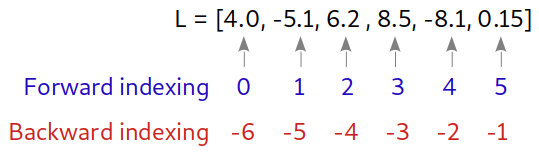
For instance, we can print any particular element of L4 defined above:
print(L4[0])   #First element of L4
print(L4[3])   #fourth element of L4
4
Red
print(L4[len(L4)-1])   #last element of L4 - forward indexing
print(L4[-1])   #last element of L4 - backward indexing
Blue
Blue
We can also use the slicing operator to obtain a subset of elements of a list.
Extracting up to the 3rd element of L4:
print(L4[:3])
[4, True, 'Yellow']
Extracting 3rd to 5th elements of L4:
print(L4[2:5])
['Yellow', 'Red', -76]
Extracting all elements of L4 except the last two:
print(L4[:-2])
[4, True, 'Yellow', 'Red', -76, 45]
4.2.2. Manipulation#
A Python list is a mutable object meaning that its contents can be changed anytime.
We can add a new member to an exisiting list using append:
L1 = [4,6,-5.6,7,-80]
L1.append(50)
print(L1)
[4, 6, -5.6, 7, -80, 50]
The appended object can be a list:
L1.append([-2.5,7])
print(L1)
[4, 6, -5.6, 7, -80, 50, [-2.5, 7]]
The result is a multidimensional list, see further below for more information.
This can be done for an empty list as well:
L0 = []
print("Before:",L0)

L0.append(45)
print("After1:",L0)
Before: []
After1: [45]
We can change any element of a list after it is defined. For this, the new value is set at a specific index:
L1[2] = 100.0
print(L1)
[4, 6, 100.0, 7, -80, 50, [-2.5, 7]]
We can delete particular elements from an existing list using remove
L1.remove(L1[2])
print(L1)
[4, 6, 7, -80, 50, [-2.5, 7]]
Two or more lists can be combined to create a new list. This is done simply by +:
L12 = L1 + L2
print(L12)
[4, 6, 7, -80, 50, [-2.5, 7], 'Red', 'Blue', 'Yellow']
https://docs.python.org/3/tutorial/datastructures.html
4.2.3. Multidimensional lists#
We can have a list of lists. More imortantly the inner lists do not need to be of the same structure.
For instance, we can define a list of a number, a list of length 2, and a list of length 3:
L = [1,[45,False],["Yellow",-78,False,8.6]]
print(L)
[1, [45, False], ['Yellow', -78, False, 8.6]]
The length of list L is 3, as it has 3 elements:
print(len(L))
3
We can refer to each of the three elements using the associated index:
print(L[0])
print(L[1])
print(L[2])
1
[45, False]
['Yellow', -78, False, 8.6]
For the elements that are list, we can use the 2nd indices to refer to a specific element of them.
For instance, the first, second, and last element of L[2] can be printed as,
print(L[2][0])   #first element of L[2]
print(L[2][1])   #second element of L[2]
print(L[2][-1])  #last element of L[2]
Yellow
-78
8.6
4.2.4. Copying#
Assume a list is given:
L5 = [34,6,-8]
We can copy this list using either copy() or list:
L6 = L5.copy()
print(L6)
[34, 6, -8]
L7 = list(L5)
print(L7)
[34, 6, -8]
If the original list L5 is updated, its copies remained unchanged:
L5.append(False)
print("L5:",L5)
print("L6:",L6)
print("L7:",L7)
L5: [34, 6, -8, False]
L6: [34, 6, -8]
L7: [34, 6, -8]
4.3. Tuples#
Tuples are similar to lists, but with the following differences:
Tuples are defined by providing values of different type within
( ).Tuples are immutable objects, meaning that their contents do NOT change.
T = (4,65,False,"Red")
print(T)
print(len(T))
(4, 65, False, 'Red')
4
Similar to lists, we can access a specific element of a tuple:
print(T[1])
print(T[-1])
65
Red
Let’s deinfe a list with the same elements as the above tuple:
L = [4,65,False,"Red"]
print('tuple:',T)
print('List:',L)
tuple: (4, 65, False, 'Red')
List: [4, 65, False, 'Red']
print(T[2])
False
We can change an element of a list, for instance:
L[1]=1000
print('updated list:',L)
updated list: [4, 1000, False, 'Red']
But the contents of a tuple cannot change. Therefore, running the following command should return an error.
T[1]=1000
---------------------------------------------------------------------------
TypeError                                 Traceback (most recent call last)
Cell In[28], line 1
----> 1 T[1]=1000

TypeError: 'tuple' object does not support item assignment
4.4. Dictionaries#
In Python we use dictionaries to store data as pairs of key:value. A dictionary is defined by providing these pairs within { }.

Once a dictionary is defined, it can act as a data structure, where we can query for the value associated with a certain key. For the above dictionary, this is done by d[key1] which returns value1. We can do this for all keys in a dictionary.
For instance, let’s create a dictionary of some information about the UK.
d1 = {'country':"UK", 'population(mil)':68, 'density(/km2,/sq mi)':[281,727.8], 'Europe':True}
As you see, the values corresponding to the keys can be of different types.
You can print the dictionary to see all paisr of key:value’s:
print(d1)
{'country': 'UK', 'population(mil)': 68, 'density(/km2,/sq mi)': [281, 727.8], 'Europe': True}
The length of this dictionary is the number of pairs of key:value within it:
print(len(d1))
4
Any dictionary has an attribute keys() which is a tuple of the keys in the dictionary:
print(d1.keys())
dict_keys(['country', 'population(mil)', 'density(/km2,/sq mi)', 'Europe'])
We can print the value associated with a certain keys:
print(d1['country'])
print(d1['density(/km2,/sq mi)'])
UK
[281, 727.8]
4.4.1. Manipulation#
Dictionaries are mutable objects, i.e. they can be modified.
For instance, we can update the value corresponding to certain key in an existing dictionary:
d1['population(mil)']=67.33
print(d1['population(mil)'])
67.33
To add a new pair of key:value to an exisiting dictionary, we use update. For instanc, we want to add the capital name of the UK to the above dictionry:
d1.update({'capital':"London"})
print(d1)
{'country': 'UK', 'population(mil)': 67.33, 'density(/km2,/sq mi)': [281, 727.8], 'Europe': True, 'capital': 'London'}
To remove a pair, command pop can be used:
removed_value = d1.pop('density(/km2,/sq mi)')

print(removed_value)
[281, 727.8]
The updated dictionary is,
print(d1)
{'country': 'UK', 'population(mil)': 67.33, 'Europe': True, 'capital': 'London'}