
9. Loops#
Saleh Rezaeiravesh and Afiq Bin Nor Kamil
saleh.rezaeiravesh@manchester.ac.uk
Department of Mechanical and Aerospace Engineering, The University of Manchester, Manchester, UK
9.1. Intended Learning Outcomes#
After trying this notebook, you should be able to:
Describe the basic definition and properties of loops in Python.
Identify the difference between
forandwhileloops.Implement simple and nested loops in Python scripts.
9.2. Structure of loops#
In Python, we have 2 main types of loops: The for loop and the while loop. Each type has its own unique purpose and application, despite being used alternatively in some specific scenarios. In addition, these loops are typically used to access and process elements of lists and matrices.
9.3. for loops#
The syntax and structure of a for loop in Python is provided in the following figure:
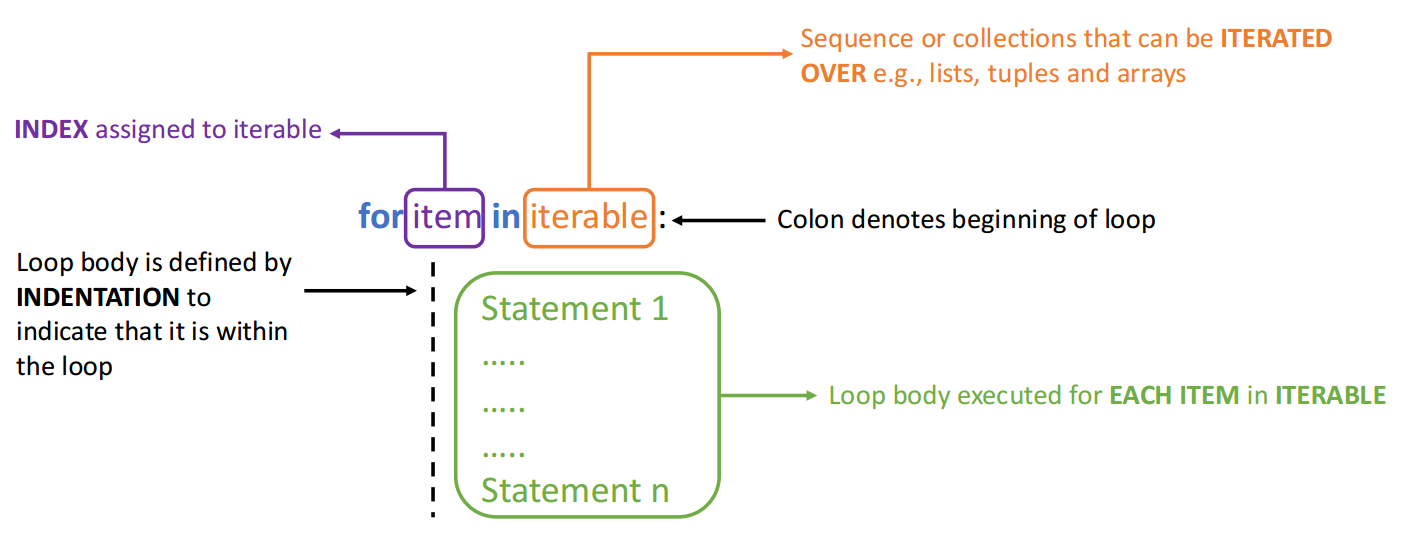
In general, we can have two types of iterables for for loops:
Lists, arrays, and tuples
A range of inetger numbers (index values)
Example: We can iterate over the elements of a given list.
myList = ['red','blue','black','purple'] #define our iterable
for item in myList: #for loop
    print(item) #statement
red
blue
black
purple
Clearly, the item does not care about the difference in data type of the elements within the iterable:
myList = ['red','blue','black','purple',-6.8,8.4,10.1] #define our iterable
for item in myList:  #for loop
    print(item)      #statement
red
blue
black
purple
-6.8
8.4
10.1
We have to be careful that when iterating over the elements of a list or tuple, the index associated with the elements has to be counted separately (i.e., it is not automatic).
This is shown in the following example where index i is updated in the loop using i += 1. This means in each iteration, the current value of i is increased by 1.
myList = ['red','blue','black','purple',-6.8,8.4,10.1]  #define our iterable

i = 0
for item in myList: #for loop
    print('Element %d in the list is %s.' %(i,item)) #statement
    i += 1    #statement
Element 0 in the list is red.
Element 1 in the list is blue.
Element 2 in the list is black.
Element 3 in the list is purple.
Element 4 in the list is -6.8.
Element 5 in the list is 8.4.
Element 6 in the list is 10.1.
An alternative way for iteration over the items within an iterable is to directly work with the indices. Let’s redo the above example but by using the indices in the for loop. To this end, we should first identify the size of the iterable (variable n):
myList = ['red','blue','black','purple',-6.8,8.4,10.1] #define our iterable
n = len(myList)   #size of the iterable

for i in range(n): #for loop
    print('Element %d in the list is %s.' %(i,myList[i])) #statement
Element 0 in the list is red.
Element 1 in the list is blue.
Element 2 in the list is black.
Element 3 in the list is purple.
Element 4 in the list is -6.8.
Element 5 in the list is 8.4.
Element 6 in the list is 10.1.
Note:
Compare the last two examples and identify the differences in the for loops. Note that the outputs of the two scripts are exactly the same.
As we see, when iterating directly on the indices, we need to use the Python built-in function range. This function generates a sequence of integer numbers that are served as indices in the for loops.
Some variations of the range function are the following:
range(a,b,c)witha,b, andcbeing integer andais the start value,bis the end value, andcis the step size. The generated numbers includeabut notb.range(a,b)returns \(a, a+1, a+2, \cdots, b-1\) where the default step sizecof 1 is used.range(b)returns \(0, 1, 2, \cdots, b-1\), i.e. it starts from 0 and goes up to \(b-1\) (step size is 1).
The general syntax of the for loop using range is:
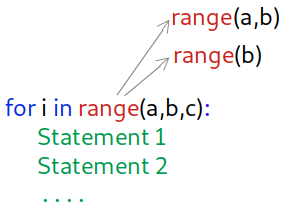
Let’s look at a few examples:
for i in range(4,15,3):
    print(i)
4
7
10
13
for i in range(4,9):
    print(i)
4
5
6
7
8
for i in range(9):
    print(i)
0
1
2
3
4
5
6
7
8
Example: Write a for loop to find the summation of integer numbers from 0 to 10.
s = 0  #initilize the variable holding the summation
for i in range(11):
    s += i  #add the i-th integer to the current value of the summation

print(s)  #this is out of the loop - prints the final value of s
55
Note that to include 10 in the summation, the value inside range is set to 11.
Example: For a given numpy array (see Arrays in numpy), find the summation of the every other elements starting from its first element. Note that the first element of a numpy array has index 0.
import numpy as np

a = np.random.rand(15)   #define a numpy array of size 10 with random elements
print(a)

n = len(a)

s = 0
for i in range(0,n,2):   #start from 0, go to the length of the given array with stepsize=2
    s += a[i]   #add the i-th element of a to the summation
    print(i)    #prints the current value of i

print(s)    #this is out of the loop - prints the final value of s
[0.95681978 0.99570008 0.98830508 0.64415561 0.32621715 0.8157348
 0.08717762 0.20178641 0.81401858 0.48459115 0.06225873 0.8653321
 0.90061523 0.05344629 0.81388396]
0
2
4
6
8
10
12
14
4.9492961373808235
Exercise: Can you modify the above scrip to find the summation of the elements of the numpy array starting from its second element with step size=3? Hint: modify the range function.
Example: Given a numpy array, we want to select a few of its elements corresponding to the indices defined by range.
a = np.random.rand(10)   #define a numpy array of size 10 with random elements

print('a = ', a)

b = []                  #Initializing the list to be updated by elements of a
for i in range(2,10,3):
    print(i)
    b.append(a[i])      #append i to the array a

print('b = ', b)   #print the outcome
a =  [0.48411845 0.04961422 0.16000999 0.50740827 0.65486276 0.37358129
 0.39238012 0.51079522 0.24715994 0.49674269]
2
5
8
b =  [0.16000998527084198, 0.3735812872453057, 0.2471599374085891]
Can you find out the connection between the elements of b and a?
9.4. While loops#
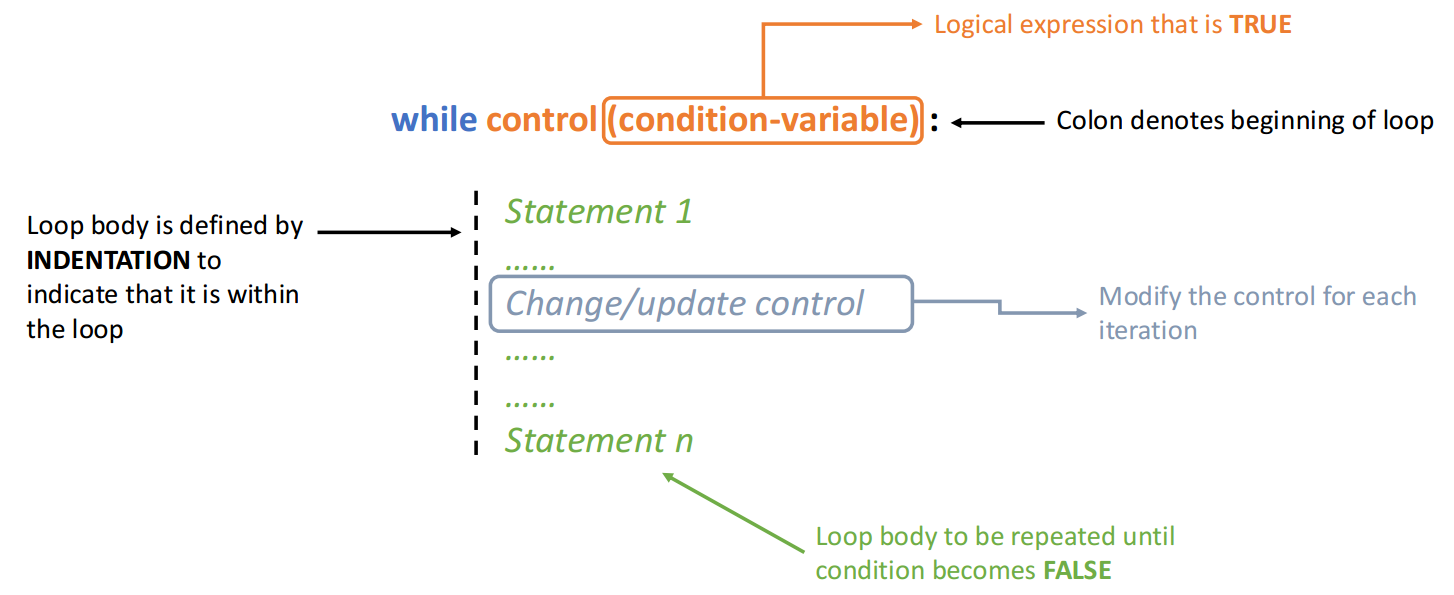
In the for loops discussed above, we always had a given finite iterable. This means, the starting and end items as well as the step size were known. In contrast, in many situations, we need to have a loop which continues as long as a certain condition evaluates to True. For these, we use the while loops with the general structure given below.
Compared to the for loops, we need to provide conditions to run or stop a while loop.
Example: Write a while loop that prints integers between 0 and 10 (excluding 10).
i=0   #initialize the index

while i<10:  # define the condition - as long as it is met, the loop continues
    print(i)
    i += 1       # we need to manually increase the index
0
1
2
3
4
5
6
7
8
9
The equivalent script of the above with for loop is:
for i in range(10):
    print(i)
0
1
2
3
4
5
6
7
8
9
Comapring these two scripts, the following differences can be notified:
Instead of
rangeinforloops, we define a condition in thewhileloop.We need to explicitly write a line to increase the index
iin each iteration of thewhileloop.
We can extend the above example to the case where the starting index is not 0 and the step size is not the default value of 1.
i=1   #initialize the index

while 1<= i <10:  # define the condition - as long as it holds, the loop continues
    print(i)
    i += 2       # we need to manually increase the index by the stepsize
1
3
5
7
9
The equivalent code using a for loop is:
for i in range(1,10,2):
    print(i)
1
3
5
7
9
Example: We can use multiple conditional statements in a loop. For instance, let’s print ineteger numbers between 0 and 10 which their squared values is below 60. This can be done by both for and while loops, as shown below.
for i in range(10):
    if (i**2 < 60):
        print(i)
0
1
2
3
4
5
6
7
i=0
while i<10 and i**2 < 60:
    print(i)
    i += 1
0
1
2
3
4
5
6
7
Do you see the difference between these two implementations?
In the
forloop, we need to write anifstatement. But in thewhileloop we can combine the two conditions usingandlogic gate.The biggest advantage of the
whileloop to theforloop in this case is its potentially better computational efficiency. Theforloop has to continuously run and check whether or not the condition in theifstatement holds. This can lead to a computational deficiency especially if the loop has to run for many more iterations than 10.
Let’s check the time required to run each of the above implementations for i changing from 0 to 9999. To measure the elapsed time, we measure the system’s time before and after running the scripts.
for loop:
import time   # a Python library to measure time

t1=time.time() #initial system time

for i in range(10000):
    if (i**2 < 60):
        print(i)

print('Elapsed time, for loop:',time.time()-t1)
0
1
2
3
4
5
6
7
Elapsed time, for loop: 0.0020682811737060547
while loop:
t1=time.time()   #initial system time

i=0
while i<10000 and i**2 < 60:
    i += 1
    print(i)

print('Elapsed time, while loop:',time.time()-t1)
1
2
3
4
5
6
7
8
Elapsed time, while loop: 0.0001983642578125
9.5. Nested loops#
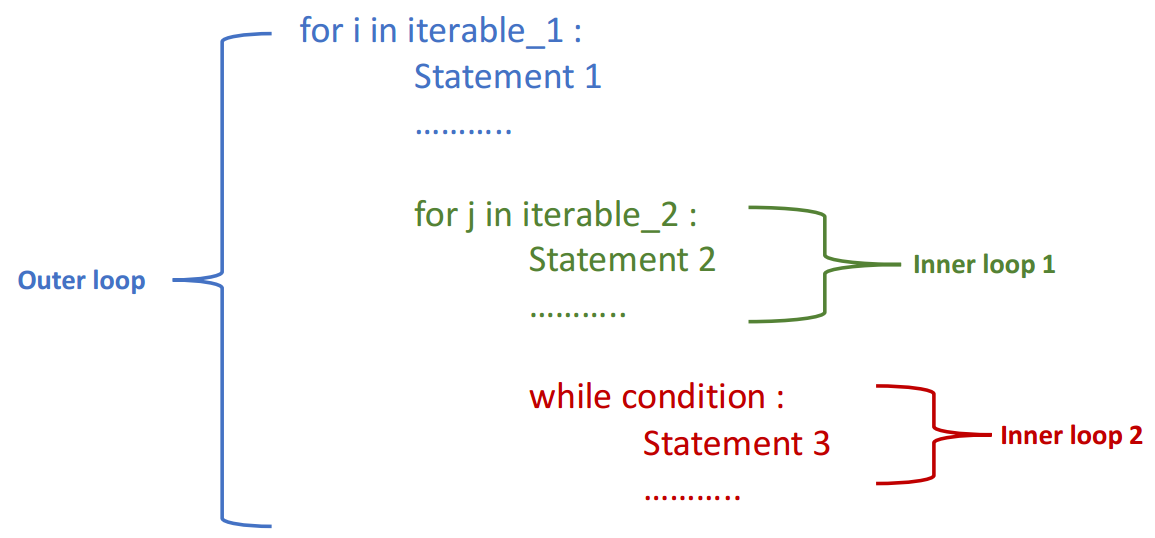
In many scenarios, we need to combine multiple for and while loops, see the example structure below.
Example: Consider a 2D numpy array of numbers is given (see Arrays in numpy).
Write a nested loop to return the elements with maximum and minimum absolute values.
import numpy as np
a = np.array([[1.6,-4.5,3.7],[8.3,-9.5,6.2]])
The size of the array in each of its two dimensions is given by shape:
print(a.shape)
(2, 3)
#initial guess for the min and max absolute value of the array's elements
aMin = abs(a[0,0])
aMax = abs(a[0,0])
for i in range(a.shape[0]):        #loop over the 1st dimension of the array
    for j in range(a.shape[1]):    #loop over the 2nd dimension of the array

        if abs(a[i,j]) < aMin:
           aMin = abs(a[i,j])        #replace aMin if the a[i,j] has a lower absolute value

        if abs(a[i,j]) > aMax:
           aMax = abs(a[i,j])        #replace aMax if the a[i,j] has a greater absolute value

print('min |aij| =',aMin)
print('max |aij| =',aMax)
min |aij| = 1.6
max |aij| = 9.5
9.6. Breaking a loop#
Sometimes we need to stop a loop before its initially set iterations is over, once a certain condition is met. In this case, we use break to break the inner-most loop. In case of having nested loop, a separate break should be used for each loop that is intended to be broken.
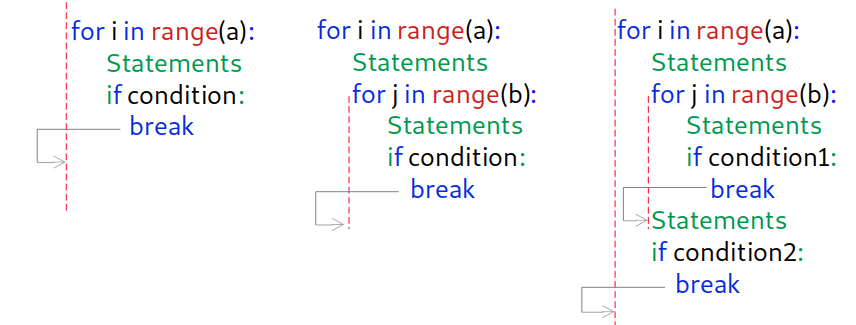
As a simple exmaple, we can stop a loop before it completes:
for i in range(10):  #initially set to run from 0 to 9
    if i == 6:      #once i==6, we ask it to stop
       break
    print('inside the loop, i =',i)  # this is executed in the loop (not affected by the if statement)

print('outside the loop, i =',i)   #outside of the loop
inside the loop, i = 0
inside the loop, i = 1
inside the loop, i = 2
inside the loop, i = 3
inside the loop, i = 4
inside the loop, i = 5
outside the loop, i = 6
Here once i becomes equal to 6 the for loop stops, therefore the last value of i printed from inside the loop is 5. But the last value of i that is printed outside of the loop is 6.
Note that, instead of the above for-break mechanism, we can use while with the same outputs:
i = 0         #initialize
while i<6:   #apply the stopping condition as the while condition
      print('inside the loop, i =',i)  # this is executed in the loop (not affected by the if statement)
      i += 1   #increase i by 1

print('outside the loop, i =',i)   #outside of the loop
inside the loop, i = 0
inside the loop, i = 1
inside the loop, i = 2
inside the loop, i = 3
inside the loop, i = 4
inside the loop, i = 5
outside the loop, i = 6
Example: Consider a list of float values, a, is given. Write a loop that computes the summation of the elements of a and stops when the summation exceeds 10.0. If the summation is below this value, append elements of a to a new list a_selected.
a = [2.5,-5.6,4.8,7.2,1.2,5.9,-8.7,-4.3,2.2,6.4,9.5]
a_selected = []   #initialize a_selected as an empty list

s = 0.0   #initialize the summation

for aa in a:   #loop over the elements of the given list a
    s += aa
    if s <= 10.0:
       a_selected.append(aa)    #append elements of a to a_selected
    else:
       break                    #break the loop

print('sum = ',s)
print('a_selected =',a_selected)
sum =  10.1
a_selected = [2.5, -5.6, 4.8, 7.2]